
I’m not a GQL specialist. I still surfaced hidden patterns in a Spanner database in an afternoon.
If your company runs on Google Cloud Spanner, the answers to some of your CEO’s most important questions are probably already in your database. Which customers spend the most? Which products get bought together? Who added something to their cart and never came back? The data is all there, encoded in foreign keys and join tables, waiting to be asked.
The problem is that SQL makes you state every connection explicitly. By the time you’ve written a five-table join to answer one business question, you’ve lost the thread of what you were actually trying to find. And the result is a table of rows, not a picture of how your customers actually behave.
I ran into this while working with Cymbal, Google Cloud’s sample e-commerce Spanner database. I extended the built-in property graph with one DDL statement, connected it to GraphXR for visual exploration, and loaded a Grovebook with seven queries any analyst can run with a single click. I also want to be upfront: I’m not a GQL specialist. I hit syntax errors along the way, and Gemini fixed most of them in seconds. That combination turned out to be the real story.
What the graph layer adds
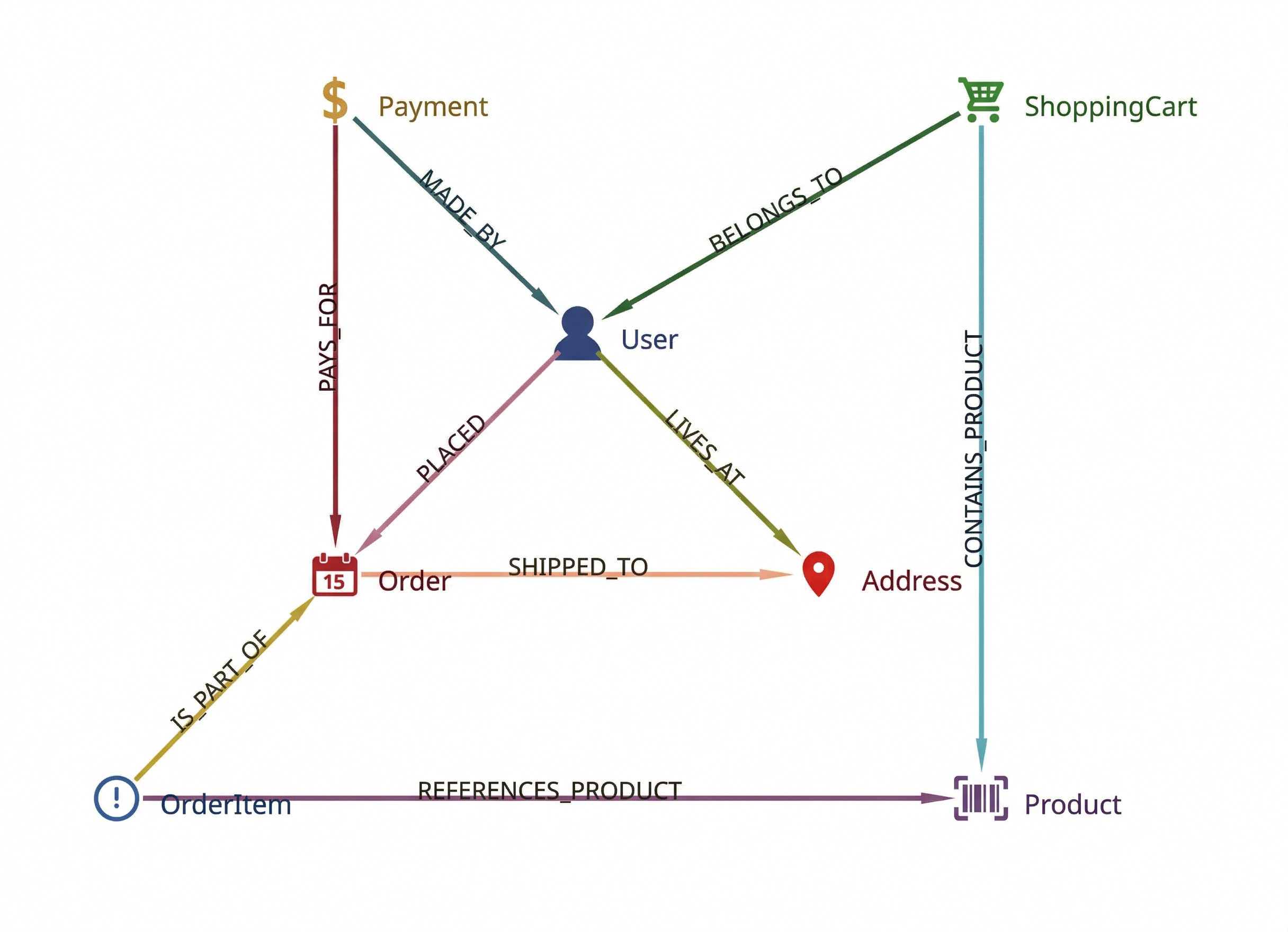
Cymbal includes a basic property graph called ECommerceGraph — five node types, two edge types, enough to traverse from users to products via orders. But it doesn’t name the relationships already implicit in the schema. The `Orders` table knows which user placed an order and where it shipped. The Payments table knows who made a payment and what it was for. Those relationships exist; they’re just not accessible as graph edges.
The extension names them. Using Spanner Graph’s LABEL syntax, one table can produce multiple named node or edge types at the same time. `Orders` becomes both a PLACED edge (User to Order) and a SHIPPED_TO edge (Order to Address). No new data, just named semantics layered on top of what’s already there. The result: 7 node types, 9 named relationships.
Cymbal Extended ECommerce Graph Schema
The DDL looks like this:
CREATE PROPERTY GRAPH ECommerceGraphExtended
  NODE TABLES(
    -- Standard tables — LABEL renames them to singular
    Users         KEY(UserID)            LABEL User
                  PROPERTIES(UserID, Email),
    Products      KEY(ProductID)         LABEL Product
                  PROPERTIES(ProductID, Name, Description, ImageURL, PriceUSD,
                             Category),
    Orders        KEY(OrderID)           LABEL `Order`
                  PROPERTIES(OrderID, OrderDate, TotalAmountUSD, OrderStatus),
    Payments      KEY(PaymentID)         LABEL Payment
                  PROPERTIES(PaymentID, PaymentDate,
                             PaymentMethod, AmountUSD, Status,
                             TransactionID),
    Addresses     KEY(UserID, AddressID) LABEL Address
                  PROPERTIES(AddressID, StreetAddress, City, State,
                             Country, ZipCode),

    -- Promoted from edges: now first-class nodes with queryable properties
    OrderItems    KEY(OrderID, OrderItemID)  LABEL OrderItem
                  PROPERTIES(OrderItemID, OrderID, ProductID, Quantity,
                             PriceAtOrderUSD),
    ShoppingCarts KEY(UserID, ProductID)     LABEL ShoppingCart
                  PROPERTIES(UserID, ProductID, Quantity, AddedDate)
  )
  EDGE TABLES(
    -- OrderItem connects to its parent Order and to the Product it references
    OrderItems AS IS_PART_OF
      KEY(OrderID, OrderItemID)
      SOURCE KEY(OrderID, OrderItemID) REFERENCES OrderItems(OrderID, OrderItemID)
      DESTINATION KEY(OrderID)         REFERENCES Orders(OrderID)
      LABEL IS_PART_OF,

    OrderItems AS REFERENCES_PRODUCT
      KEY(OrderID, OrderItemID)
      SOURCE KEY(OrderID, OrderItemID) REFERENCES OrderItems(OrderID, OrderItemID)
      DESTINATION KEY(ProductID)       REFERENCES Products(ProductID)
      LABEL REFERENCES_PRODUCT,

    -- ShoppingCart connects to its User and to the Product it contains
    ShoppingCarts AS BELONGS_TO
      KEY(UserID, ProductID)
      SOURCE KEY(UserID, ProductID) REFERENCES ShoppingCarts(UserID, ProductID)
      DESTINATION KEY(UserID)       REFERENCES Users(UserID)
      LABEL BELONGS_TO,

    ShoppingCarts AS CONTAINS_PRODUCT
      KEY(UserID, ProductID)
      SOURCE KEY(UserID, ProductID) REFERENCES ShoppingCarts(UserID, ProductID)
      DESTINATION KEY(ProductID)    REFERENCES Products(ProductID)
      LABEL CONTAINS_PRODUCT,

    -- Orders table yields two edge types: who placed it, where it shipped
    Orders AS PLACED
      KEY(OrderID)
      SOURCE KEY(UserID)       REFERENCES Users(UserID)
      DESTINATION KEY(OrderID) REFERENCES Orders(OrderID)
      LABEL PLACED,

    Orders AS SHIPPED_TO
      KEY(OrderID)
      SOURCE KEY(OrderID)                        REFERENCES Orders(OrderID)
      DESTINATION KEY(UserID, ShippingAddressID) REFERENCES Addresses(UserID,
                                                                      AddressID)
      LABEL SHIPPED_TO,

    -- Where the user lives
    Addresses AS LIVES_AT
      KEY(UserID, AddressID)
      SOURCE KEY(UserID)                 REFERENCES Users(UserID)
      DESTINATION KEY(UserID, AddressID) REFERENCES Addresses(UserID,
                                                              AddressID)
      LABEL LIVES_AT,

    -- Payments table yields two edge types: what it paid for, who made it
    Payments AS PAYS_FOR
      KEY(PaymentID)
      SOURCE KEY(PaymentID) REFERENCES Payments(PaymentID)
      DESTINATION KEY(OrderID) REFERENCES Orders(OrderID)
      LABEL PAYS_FOR,

    Payments AS MADE_BY
      KEY(PaymentID)
      SOURCE KEY(UserID)         REFERENCES Users(UserID)
      DESTINATION KEY(PaymentID) REFERENCES Payments(PaymentID)
      LABEL MADE_BY
  );
One statement. The graph is live immediately.
One thing caught me off guard: Order is a reserved word in SQL. Spanner Studio refused to parse my DDL, and the error message wasn’t helpful. I stared at it for a while before remembering that backticks fix it. Easy fix once you know, but it cost me time.
The questions you can ask now
GraphXR reads the schema automatically — all 7 node types and 9 edge types appear in the query bar. I loaded them into a Grovebook, GraphXR’s interactive notebook, so anyone on the team can run the queries below with a single click.
Who added something to their cart and never bought it?
GRAPH ECommerceGraphExtended
MATCH (sc:ShoppingCart)-[:BELONGS_TO]->(u:User),
      (sc)-[:CONTAINS_PRODUCT]->(p:Product)
WHERE NOT EXISTS {
  MATCH (user_alias:User)-[:PLACED]->(o:`Order`)<-[:IS_PART_OF]-
  (oi:OrderItem)-[:REFERENCES_PRODUCT]->(product_alias:Product)
  WHERE user_alias = u AND product_alias = p
}
RETURN u.Email, p.Name, sc.Quantity, sc.AddedDate
LIMIT 100
A table of users, the products they abandoned, and when. In SQL, that’s a NOT EXISTS across three joined tables. Here, it reads almost like a sentence.
Which products get bought together?
GRAPH ECommerceGraphExtended
MATCH (p1:Product)<-[:REFERENCES_PRODUCT]-(oi1:OrderItem)-[:IS_PART_OF]->(o:`Order`)<-[:IS_PART_OF]-(oi2:OrderItem)-[:REFERENCES_PRODUCT]->(p2:Product)
WHERE p1.ProductID < p2.ProductID
WITH p1, p2, COUNT(o) AS timesBoughtTogether
ORDER BY timesBoughtTogether DESC
LIMIT 20
RETURN p1.Name AS product1, p2.Name AS product2, timesBoughtTogether
A ranked list of product pairs by co-occurrence. The raw material for a recommendation engine, queryable in seconds. This one only works because OrderItem is a first-class node you can traverse through — without that, there’s no path connecting two products through a shared order.
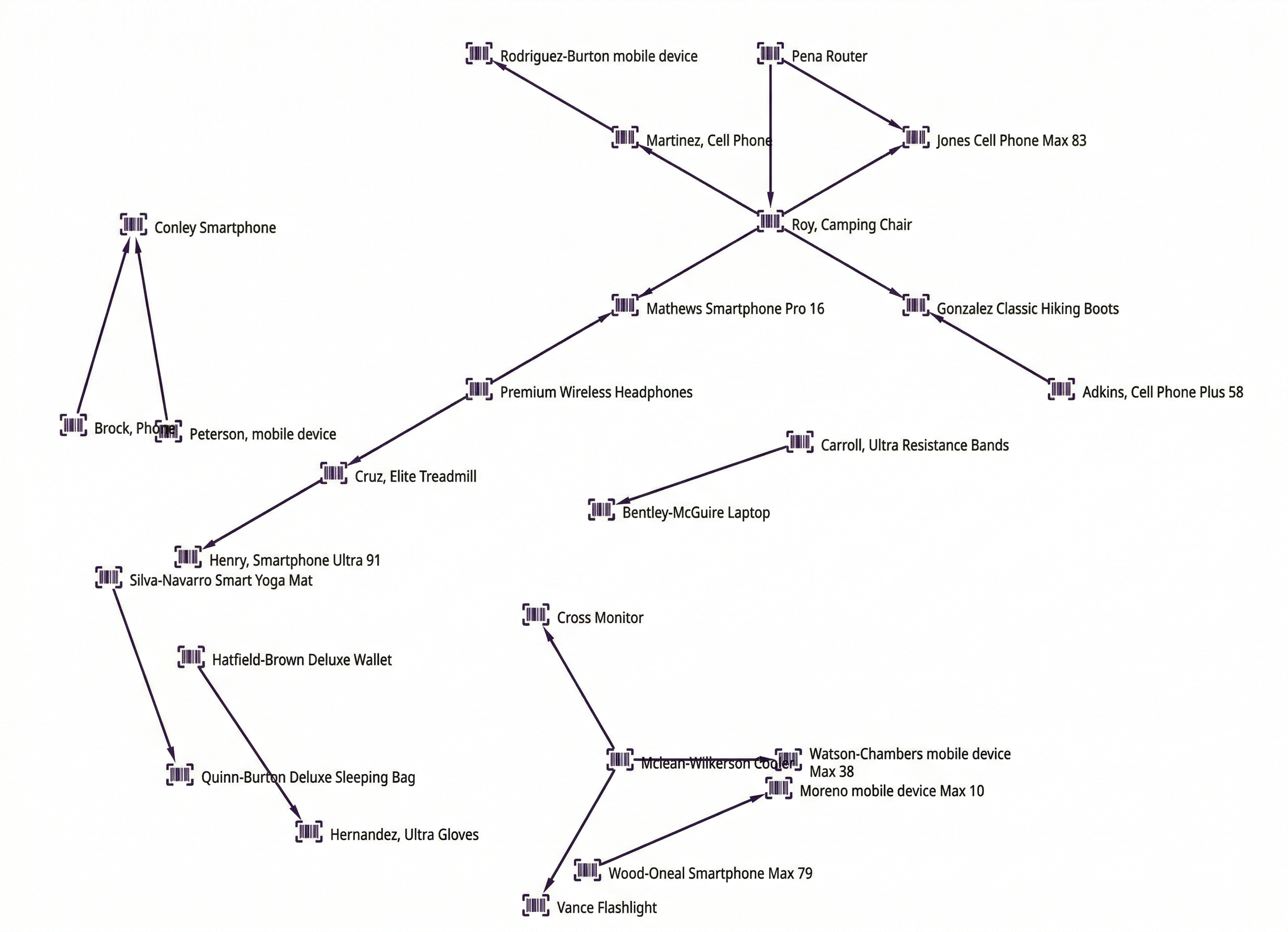 Products bought together
Who are your top customers by lifetime value?
GRAPH ECommerceGraphExtended
MATCH (u:User)-[:PLACED]->(o:`Order`)
WITH u, SUM(o.TotalAmountUSD) AS totalSpend, COUNT(o) AS orderCount
ORDER BY totalSpend DESC
LIMIT 20
RETURN u.Email AS email, u.UserID AS userId, totalSpend, orderCount
In GraphXR, these load as nodes sized by spend. Your biggest customers are literally the biggest circles on the screen.
Where Gemini came in
The NOT EXISTS pattern in particular tripped me up — Spanner GQL doesn’t let you reuse outer query variables directly inside a subquery. Every time I tried, the query returned nothing and I couldn’t figure out why.
I pasted the error into Gemini. It explained the issue in one paragraph: inner subqueries need their own typed variable names, bound back to the outer scope with a WHERE clause. I fixed the remaining queries in a few minutes. The point isn’t that GQL is hard — it’s that you don’t need to master it before you can use it. You just need to be willing to debug with help.
The broader point
Your Spanner schema already encodes relationships. Every foreign key is a named relationship waiting to be expressed. The graph DDL is just the act of naming them so they become traversable, and once they’re traversable, questions that felt like engineering projects become one-line queries.
If your team has Spanner and a business question that involves more than one table, this pattern is worth an afternoon.
Resources: